On this page
Automation
There is no separate automation environment any more. Manual, automation and mobile became one: Test Lab, Test Library and Test logins. Automation is what happens to a test after the first run, when its steps are saved and can be replayed by a button, a schedule of your own, or your pipeline.
Run with a test agent, then run at no AI cost
Any suite in Test Library runs with one button, including suites imported from Excel or CSV. The first run explores the site and saves what it did. Every run after that replays those steps with no AI cost unless a step needs the AI. If the page has moved on, the AI picks the test up from the step that broke rather than from the beginning.
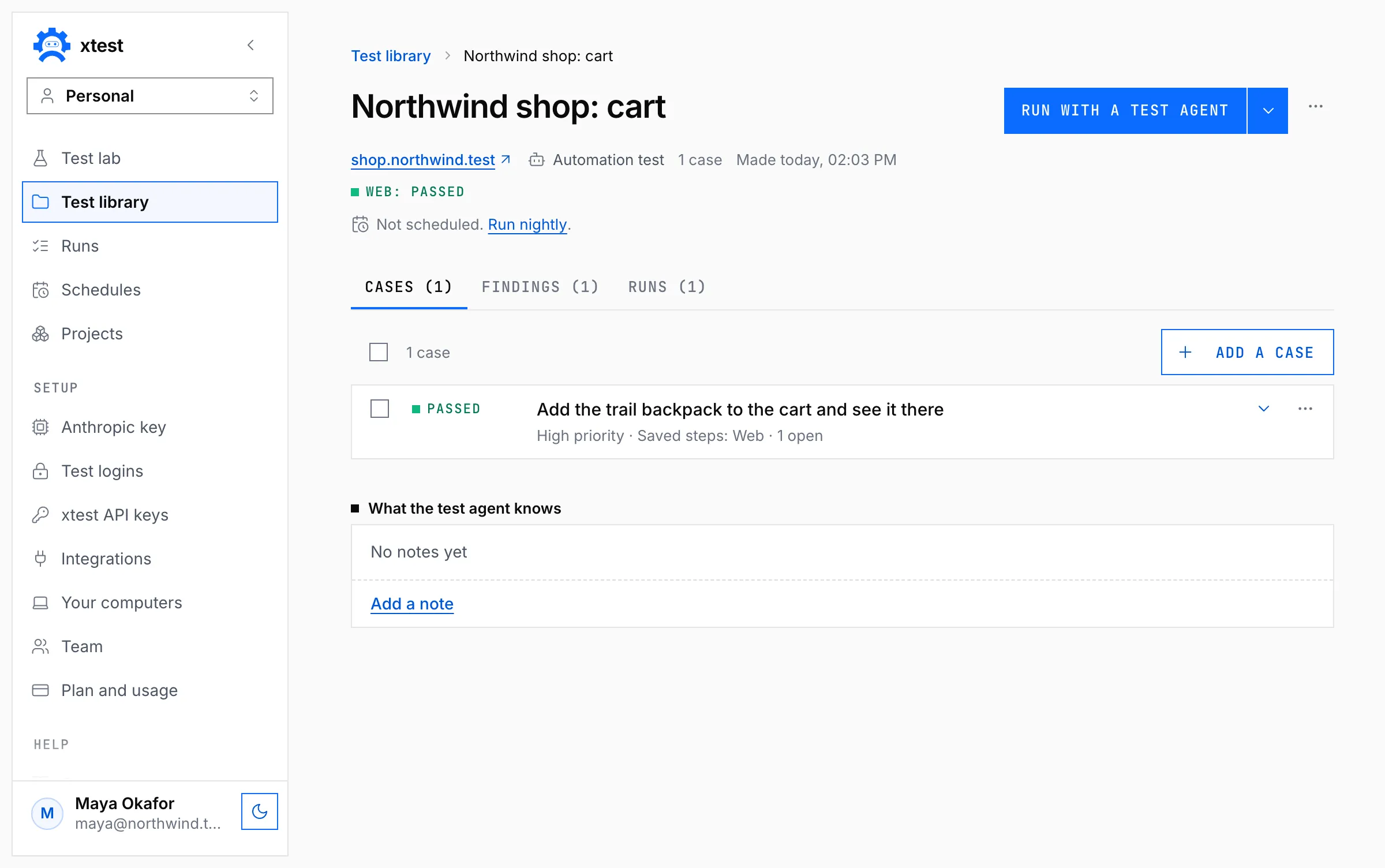
Saved steps: Web on the case means the next run in a browser replays the steps rather than working them out again.
From your pipeline
One POST starts a run and answers straight away with its id; poll it until it is over, as below. Runs started with a key go to the Cloud browser, so nothing has to be installed on your build machine. The loop asks again after a 429, a 5xx or no answer at all, stops with xtest's reason for any other refusal, and stops waiting after 30 minutes. A run takes at most 200 tests; a larger suite runs as several runs that carry on from one another, and the loop waits for all of them. When xtest's own deploy cuts a run, a run reaches six hours, or the Cloud browser stops part way, xtest starts the rest itself and the loop waits for that run too, and the run it carried on counts for its tests, not for how it ended; only a stop you pressed, a run that wrote no result, or a rest xtest could not start ends a suite with tests left. The loop ends on the verdict and fails unless every test passed: a test a run skipped, or one that could not finish, is printed with why and fails it too. So does a step a test agent marked not checked because the device cannot do it, such as one that needs someone speaking into the microphone, unless XTEST_ALLOW_NOT_CHECKED is true. A case a test agent added waits for a person to press Looks good on the test's page; until then a run started with a key leaves it out, the start's note says how many, and the build does not fail for it. If every case of the test waits, the start is refused with xtest's reason and the loop fails. The CI/CD page has the whole script, which does the same and prints each run's summary on the way.
# Start a suite and wait up to 30 minutes for it to be over.
# The start may first wait up to 40 seconds for a verify run on the same
# device to give it back, so it gets 90 seconds; each poll gets 30.
ANSWER=$(curl -s --max-time 90 -X POST https://xtest.io/api/v1/suites/$SUITE_ID/runs \
  -H "X-API-Key: $XTEST_API_KEY" \
  -H "Content-Type: application/json" \
  -d '{"ai":"repair"}')
RUN=$(echo "$ANSWER" | jq -r '.runId // empty')
[ -n "$RUN" ] || { echo "$ANSWER" | jq -r '.error // "The run did not start."'; exit 1; }
echo "$ANSWER" | jq -r '.note // empty'

# The answer is { "run": { ... } }. A run with a test agent is over when
# "finished" is true; a suite with a Playwright script, when its status is
# no longer "running". A 429, a 5xx or no answer at all (000) is asked again.
# Any other answer with no "run" in it is xtest saying why not. A run takes
# at most 200 tests: when a run is over with tests left (testsLeft), xtest
# starts a run of the rest that carries on from it and names it in
# nextRunId, and this loop waits for that run too. It does the same after
# xtest's own restart cut a run, or a run reached six hours: both are
# xtest's doing, told by the run's sentence. A run xtest carried on counts
# for its tests' results, not its ending. Only a person's Stop ends a suite
# with tests left. A test a run skipped, or one that could not finish, is
# not a pass: each is printed with why, and the loop fails on it.
worse() {
  for v in failed error blocked stopped interrupted; do
    if [ "$1" = "$v" ] || [ "$2" = "$v" ]; then echo "$v"; return; fi
  done
  if [ "$1" = "passed" ]; then echo "$2"; else echo "$1"; fi
}
DEADLINE=$(( $(date +%s) + 30 * 60 ))
VERDICT=passed
UNFINISHED=0
# A step its test agent marked not checked (notChecked), one the device cannot
# do, is not a pass either, unless XTEST_ALLOW_NOT_CHECKED is true.
UNCHECKED=0
SEEN=""
while :; do
  ANSWER=$(curl -s --max-time 30 -w '\n%{http_code}' https://xtest.io/api/v1/runs/$RUN -H "X-API-Key: $XTEST_API_KEY")
  CODE=${ANSWER##*$'\n'} BODY=${ANSWER%$'\n'*}
  case "$CODE" in
    000|429|5??) ;;
    *) echo "$BODY" | jq -e .run > /dev/null || { echo "$BODY" | jq -r '.error // "The run could not be read."'; exit 1; }
       if [ "$(echo "$BODY" | jq -r '.run | if .ai then .finished else .status != "running" end')" = "true" ]; then
         STATUS=$(echo "$BODY" | jq -r .run.status)
         NEXT=$(echo "$BODY" | jq -r '.run.nextRunId // empty')
         if [ "$SEEN" != "$RUN" ]; then
           SEEN=$RUN
           echo "$BODY" | jq -r '.run.tests[]? | select(.status == "skipped" or .status == "blocked")
             | "  " + .statusWord + ": " + .title + (if .summary then "  <- " + .summary else "" end)'
           UNFINISHED=$((UNFINISHED + $(echo "$BODY" | jq '[.run.tests[]? | select(.status == "skipped" or .status == "blocked")] | length')))
           UNCHECKED=$((UNCHECKED + $(echo "$BODY" | jq '.run.notChecked // 0')))
         fi
         if [ -n "$NEXT" ]; then
           echo "$STATUS, then run $NEXT carries on"
           # Carried on: its ending is not the verdict, the results it wrote are.
           TESTS=$(echo "$BODY" | jq -r '[.run.tests[]?.status] | if any(. == "failed") then "failed" elif any(. == "error") then "error" elif any(. == "blocked") then "blocked" elif any(. == "skipped") then "incomplete" else "passed" end')
           VERDICT=$(worse "$VERDICT" "$TESTS")
           RUN=$NEXT
         elif ! echo "$BODY" | jq -e '.run | .testsLeft > 0 and ((.status | IN("passed","failed","blocked","error"))
             or (.status == "stopped" and .error == "This run reached six hours and stopped. Run the remaining tests to carry on.")
             or (.status == "interrupted" and .error == "xtest restarted while this run was in progress. Run it again."))' > /dev/null; then
           VERDICT=$(worse "$VERDICT" "$STATUS")
           break
         fi
       fi ;;
  esac
  [ "$(date +%s)" -lt "$DEADLINE" ] || { echo "Stopped waiting after 30 minutes. The run goes on in xtest."; exit 1; }
  sleep 5
done

# The verdict, and a non-zero exit unless every test passed.
if [ "$UNFINISHED" -gt 0 ] && [ "$VERDICT" = "passed" ]; then VERDICT=incomplete; fi
if [ "$UNCHECKED" -gt 0 ] && [ "${XTEST_ALLOW_NOT_CHECKED:-}" != "true" ]; then
  echo "Steps not checked: $UNCHECKED, so not every step passed. Set XTEST_ALLOW_NOT_CHECKED=true to let such a run pass."
  if [ "$VERDICT" = "passed" ]; then VERDICT=incomplete; fi
fi
echo "$BODY" | jq -r --arg verdict "$VERDICT" '$verdict + (if .run.testsLeft > 0 then ", \(.run.testsLeft) tests in no run" else "" end)'
[ "$VERDICT" = "passed" ]
ai: "repair"
Saved steps replay, and the AI steps in from the first step that no longer fits the page. The default.
ai: "off"
Saved steps replay and nothing else. A test with no saved steps, one whose steps were edited after they were saved, or one whose saved steps stop part way is skipped; one whose saved step types a value read off the screen replays up to that step and stops there, as one that could not finish; a test stops at the first step that does not fit and is marked as one that could not finish; and a test whose saved check fails is still marked failed. The loop fails on every one of them. That is what you want in a pipeline that must not spend on AI.
What a run leaves behind
Every run, however it started, lands in Runs with its steps, how long it took, what it cost and what the AI reported, and the screenshots a test agent took are kept with it for 30 days. Logins the tests use live in Test logins, encrypted with AES-256-GCM, and a password never appears in a transcript.