[Phone apps]
Your phone app, tested on simulators and emulators on your own computer.
Install your own build on an iPhone simulator on a Mac or an Android emulator on a Mac with macOS 12 or later, or an x64 PC, describe the test, and watch a test agent tap through it. Your mobile site works the same way, in Safari or Chrome on the device.
Test agents on phones need the xtest app: iPhone on a Mac, Android on a Mac with macOS 12 or later, or an x64 PC.
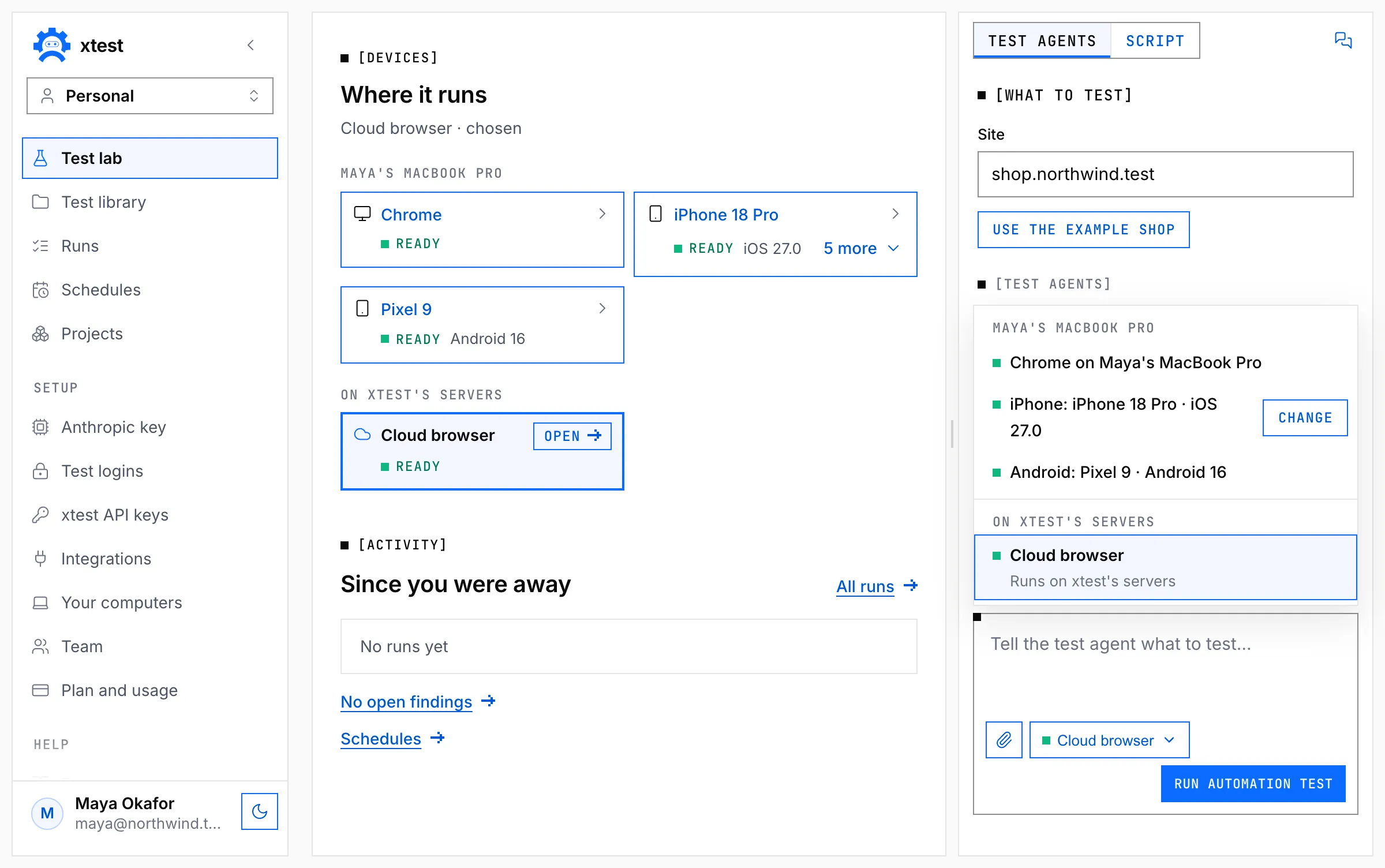
The device picker on a Mac with the xtest app: Chrome, an iPhone simulator and an Android emulator, beside the Cloud browser.
7 of 8
Test agents that run on phones
6
Kinds of check on a phone screen
About 2.5 GB
Android, set up for you on macOS 12 or later or an x64 PC; needs 14 GB free
[01 · What you need]
A Mac, the xtest app, and your build.
iPhone and iPad simulators
On a Mac with Xcode installed. The app lists the simulators Xcode has. When Xcode has none, Set up downloads Apple’s iPhone simulator.
Android emulators
On a Mac with macOS 12 or later, or an x64 PC, the xtest app sets Android up for you: about 2.5 GB, and it needs 14 GB free.
Your own build
Install a .apk on Android or a simulator .app on iOS from the app’s window, onto a running simulator or emulator. A refusal says what to do.
A known starting state
Choose per app whether a test starts fresh or keeps its data, which permissions to answer, and a link to open at.
[Your build]
Bring an .apk or a simulator .app and try it on your Mac.
[02 · On a phone]
The same test agents, on the device itself.
Apps and sites
Your app, or your site in Safari on an iPhone simulator or in Chrome on an Android emulator, with every check run on the device.
Saved steps replay
A passing run is saved as steps that replay at no AI cost unless a step needs it, as on the web.
Long lists
“Scroll until this row shows” is saved as one step and replays even when the list has grown.
xtest app 0.5.8 and later
Crashes count
An app that leaves the screen during a replay is a crash, not a pass.
Findings name the build
Each finding records the build of the app it was found on.
Accessibility on phones
The names a screen reader reads and the size of tap targets, with a plain note of what was not checked.
A dropped network
The test agent takes an Android emulator offline partway through a test to see how your app copes, and its network comes back once the test ends.
xtest app 0.5.11 and later
The phone’s conditions
The test agent turns the screen, sends the app to the background, denies a permission, switches to dark, sets the largest text or pinches, mid-test, and xtest puts each setting back afterwards, or says it could not and runs no more tests on that phone while it stays changed.
xtest app 0.5.12 and later
[03 · Phones on a cable]
Saved scripts on an Android phone plugged in by USB.
A saved script, recorded or pasted Playwright, runs in Chrome on an Android phone on a cable, from a Mac or a PC where the app finds Android’s platform-tools, with the xtest app 0.5.16 or later. Chrome keeps its tabs, history, cookies and sign-ins. The run closes Chrome when it ends and puts back what starting Chrome changed: how Chrome starts, and its notification permission. If the xtest app quits during a run, from 0.5.17 it puts them back as it quits, or if it cannot, the next time it starts with the phone plugged in; with an older app, the run’s record says where on the phone to turn them back. The testing tools install their helper apps on the phone the first time and leave them there, and relax Android’s limit on hidden system interfaces while a run’s session is open, setting it back to Android’s default as the session closes. A run cut short while its session is still opening can leave the limit relaxed until, at the latest, a later run on that phone finishes. Test agents do not drive a phone on a cable yet.
The app finds the phone through Android’s platform-tools: the ones its Android setup brings (about 2.5 GB, 14 GB free; on a Mac, macOS 12 or later), or your own in Android Studio’s SDK folder; on an ARM PC, which gets no emulator, unzip Google’s platform-tools into %LOCALAPPDATA%\Android\Sdk first, where the app looks.
[04 · What it does not do]
What it does not do
- A real iPhone or iPad, on any computer.
- iPhone simulators on Windows: Apple’s tools run only on macOS.
- Test agents on a phone on a cable.
- The performance test agent on phones: any number it gave there would be invented.
- Some conditions mid-test: a time zone, taking an iPhone simulator offline, and the location, a pushed notification or a fingerprint on an Android emulator.
[05 · Questions]
Questions
No. The simulators and emulators run on your own Mac, through the xtest app.
No. A real iPhone or iPad is not supported on any computer; test agents use iPhone simulators on a Mac.
Partly. On an x64 PC the xtest app sets up an Android emulator, which test agents use from xtest app 0.5.33, and runs saved scripts in Chrome on it or on a phone on a cable; an ARM PC gets no emulator, and runs saved scripts only on a phone on a cable once Google’s platform-tools are unzipped into %LOCALAPPDATA%\Android\Sdk, where the app looks. iPhone simulators always need a Mac.
From the xtest app’s window: a .apk for Android or a simulator .app for iOS, installed onto a simulator or emulator that is running.
Not its Chrome, from the xtest app 0.5.16 on. A saved script on a phone on a cable runs in the phone’s own Chrome, which keeps its tabs, history, cookies and sign-ins, and what starting Chrome changes is put back after the run; the run says so if something could not be. If the xtest app quits during a run, from 0.5.17 it puts that back as it quits, or if it cannot, the next time it starts with the phone plugged in, and the next run on the phone says so; with an older app, the run’s record says what may be left and where on the phone to turn it back. Older apps cleared Chrome’s data there, so xtest sends them no run on a phone. The testing tools do install their own helper apps on the phone the first time, and those stay until you uninstall them. They also relax Android’s limit on hidden system interfaces while a run’s session is open and set it back as the session closes; a run cut short while its session is still opening can leave the limit relaxed until, at the latest, a later run on that phone finishes.
Seven of the eight. Performance is web only, because any number it gave on a phone would be invented.
[Explore the product]
Explore the product
Every claim on this page was checked against xtest’s code on October 11, 2026. If one has gone stale, write to info@xtest.io.
Test your app on the simulators you already have.
Install the xtest app on your Mac and pick a simulator in Test Lab.