Tell the AI what to test.
Watch it work.
A passing run is saved, then replayed.
Plans from $25 a month. Cancel anytime.
Cloud browser
nothing to install
Chrome
your Mac or PC · xtest app
iPhone simulator
your Mac · xtest app
Android emulator
your Mac or PC · xtest app
[01 · See it run]
From a sentence to a saved test.
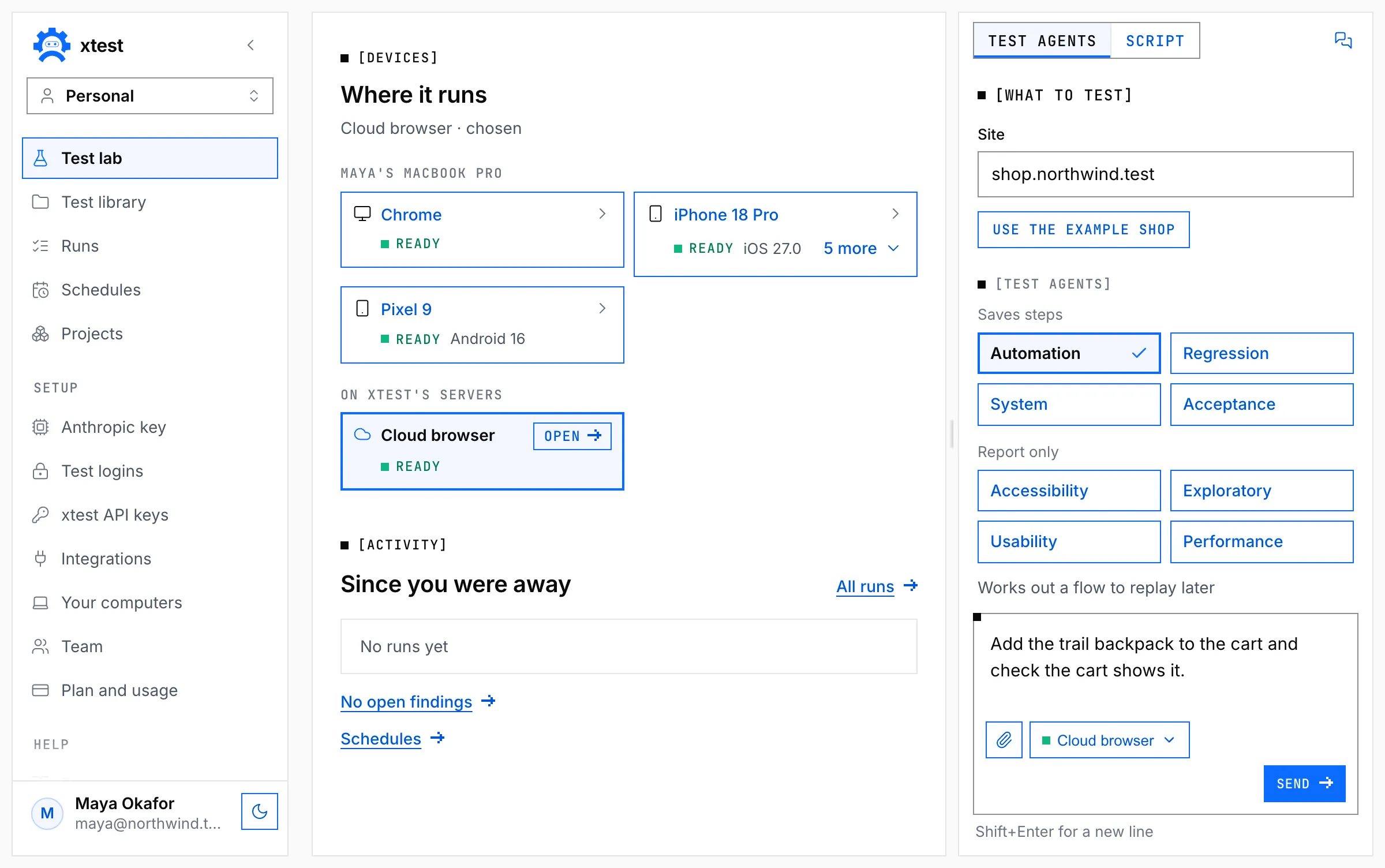
Pick a device, say what to test
The Cloud browser, or a device of yours.
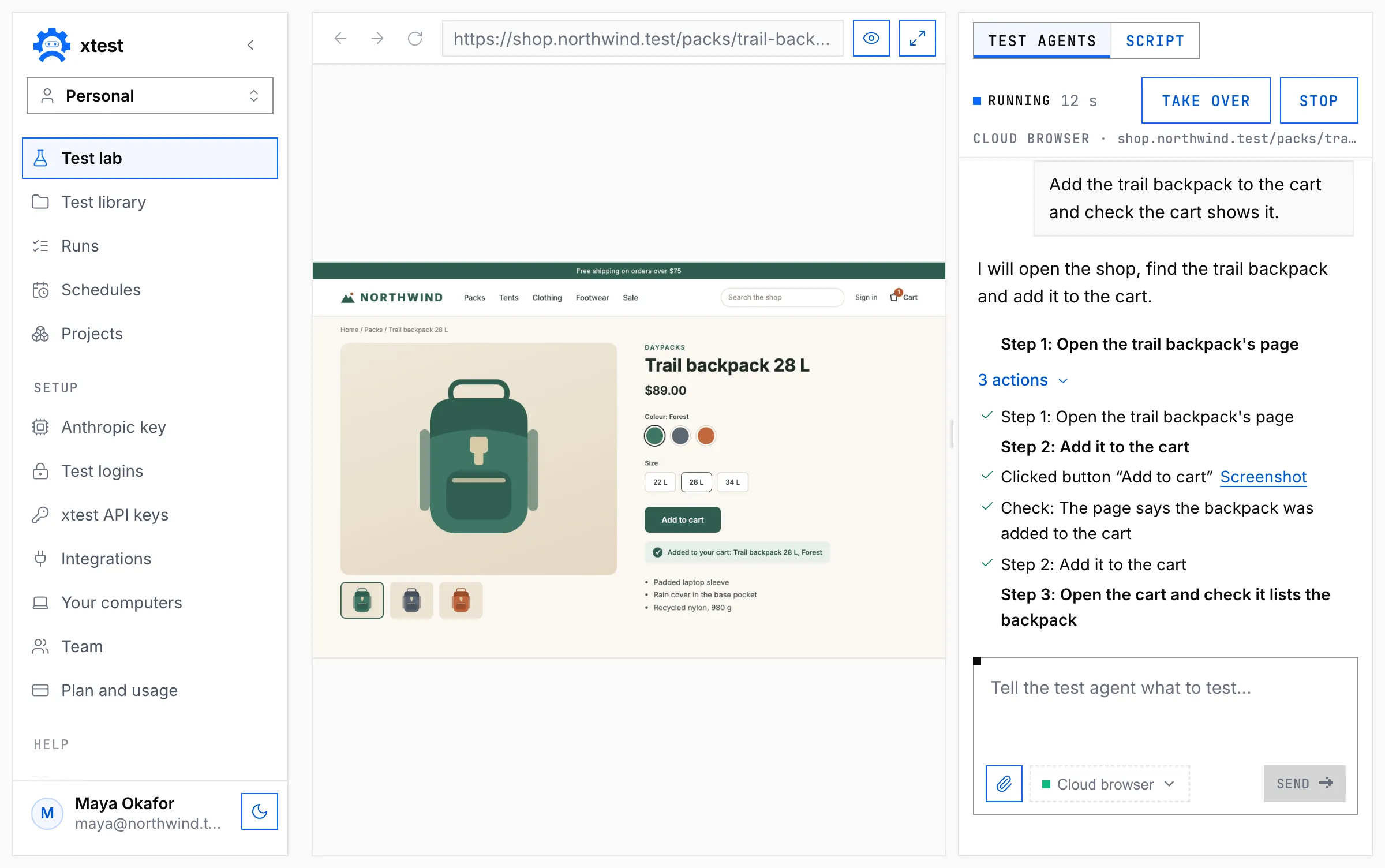
Watch it work, or take over
The live page is on the left.
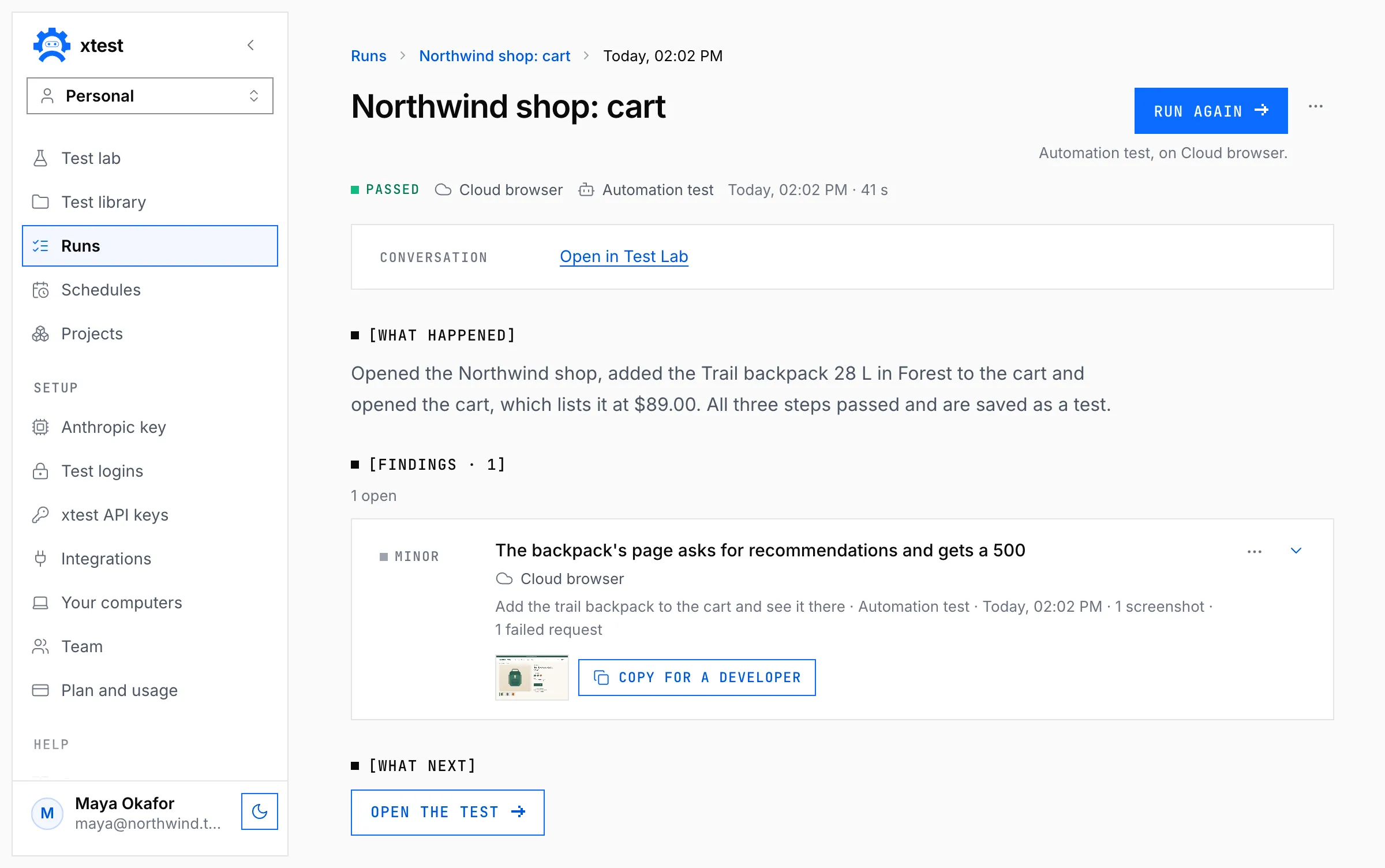
Read what happened
What it found, with 30 days of screenshots.
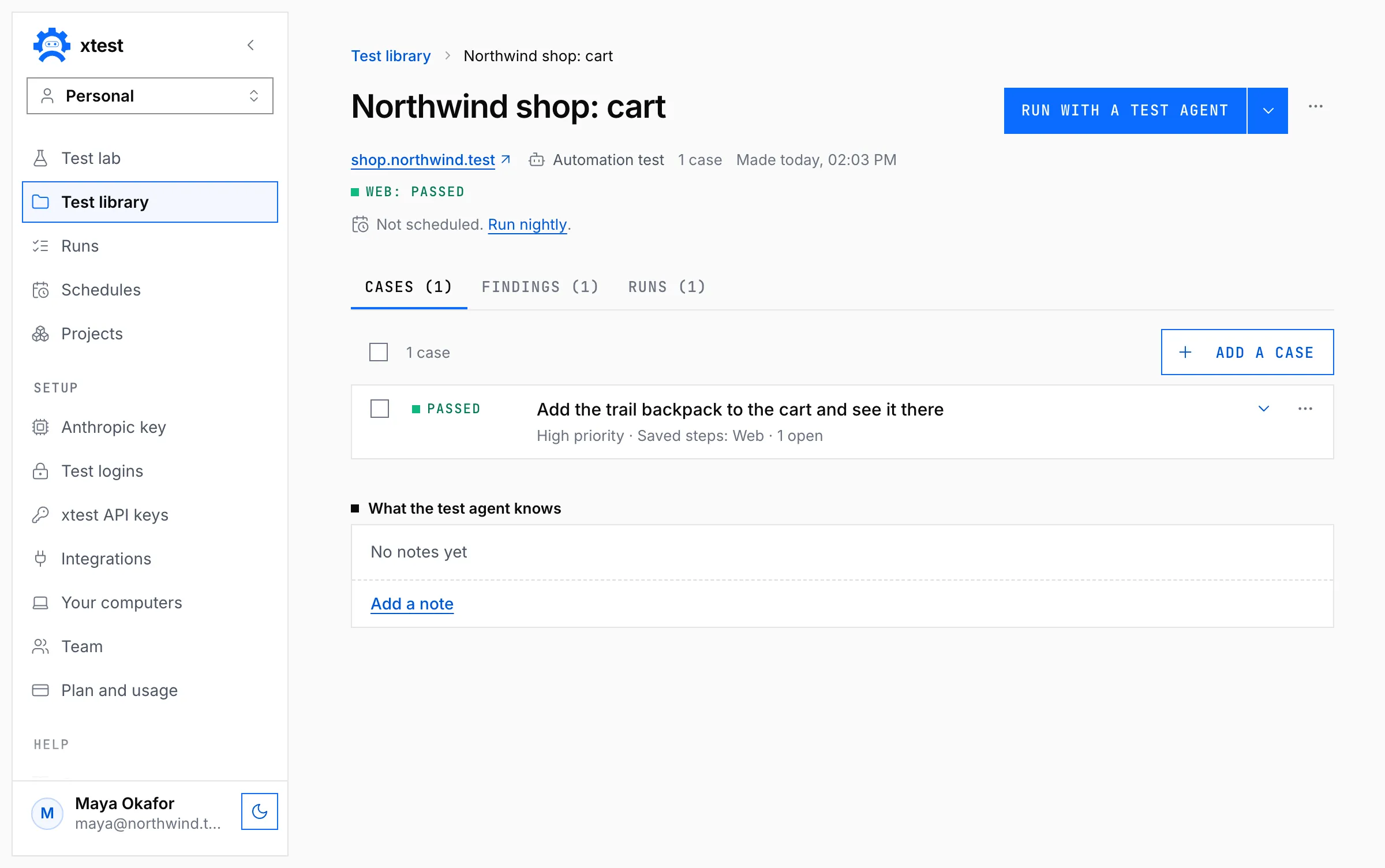
Run it again with one button
Run with a test agent replays the saved steps.
[02 · How it works]
The first run explores. The rest replay.
First run
The test agent explores
A run that passes saves its steps.
Later runs
Saved steps replay
No AI, unless a step reads the screen.
Your app changed
Repair from the step that broke
You pay for the part that moved.
Every run
One list of runs
Steps, findings and AI cost, from any trigger.
Your first test is one sentence.
The Cloud browser needs nothing installed.
[03 · Where it runs]
Pick where each run happens.
The Cloud browser, or your own computer.
| Test agents | Saved scripts | By hand | What you need | |
|---|---|---|---|---|
| Cloud browseron xtest’s servers | Included | Yes: record or paste Playwright | Not included | Nothing to install. Public addresses only. |
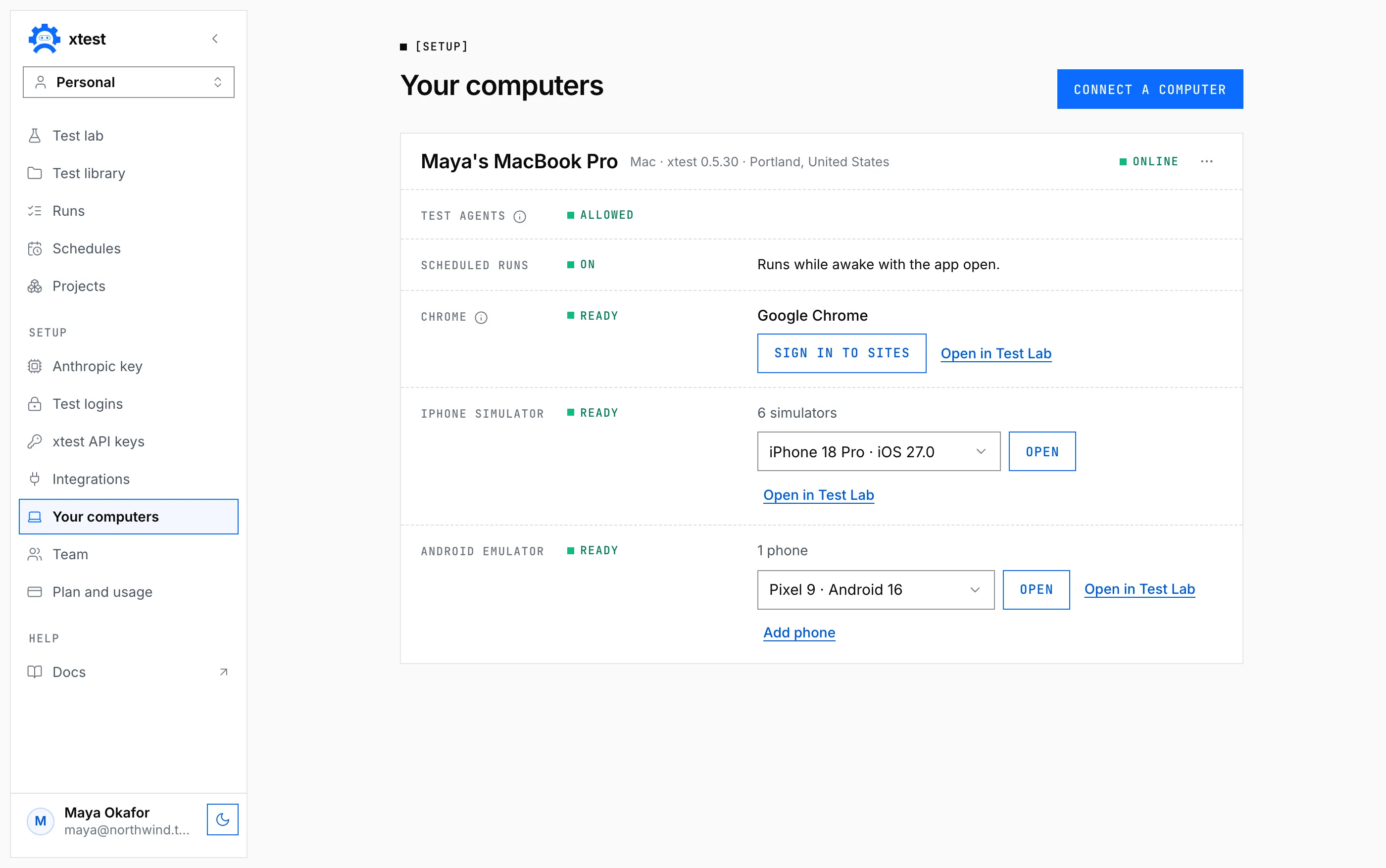
| Chrome on your Mac or PCsigned in to your sites | Yes; on Windows from app 0.5 | Yes, also at iPhone size | Yes, as a checklist | The xtest app |
| iPhone simulatoryour app, or your site in Safari | Included | Yes, in Safari | Not included | A Mac with Xcode, and the xtest app |
| Android emulator on a Macyour app, or your site in Chrome | Included | Yes, in Chrome | Not included | A Mac with macOS 12 or later, and the xtest app |
| Android emulator on an x64 PC | Yes, from app 0.5.33 | Yes, in Chrome | Not included | The xtest app. Not on an ARM PC. |
| Android phone on a USB cable | Not yet | Yes, in its Chrome | Not included | The cable and the xtest app |
Not supported: real iPhones or iPads, desktop Safari or Firefox, desktop apps.
[04 · Test agents]
Eight test agents, each with one job.
Automation
Works a flow out and saves the steps.
Web · iPhone · Android
Saves steps
Regression
Replays what passed and reports what changed.
Web · iPhone · Android
Steps and findings
Accessibility
WCAG 2.2 A and AA rules, then keyboard checks.
Web · reduced on phones
Findings
System
Checks data survives a whole journey.
Web · iPhone · Android
Steps and findings
Exploratory
Hunts defects nobody wrote a test for.
Web · iPhone · Android
Findings
Usability
Finds where a first-time user gets stuck.
Web · iPhone · Android
Findings
Acceptance
One verdict per requirement, with evidence.
Web · iPhone · Android
Steps and findings
Performance
Loads each page three times, against your budget.
Web only
Findings
[05 · Schedules, CI and MCP]
Run it nightly, from CI, or by MCP.
On a schedule
On the Cloud browser, or a computer you allow.
One email in the morning
By default, only when something changed.
From CI
One request, one suite, on the Cloud browser.
curl -X POST https://xtest.io/api/v1/suites/SUITE_ID/runs \
  -H "X-API-Key: xtest_live_…" \
  -H "Content-Type: application/json" \
-d '{ "ai": "repair" }'From your coding tool
Five MCP tools, with the same API key.
{
  "mcpServers": {
    "xtest": {
      "type": "http",
      "url": "https://xtest.io/mcp",
      "headers": { "X-API-Key": "xtest_live_…" }
    }
  }
}
Add this to your coding tool’s MCP settings.
[06 · Safe by default]
It asks before it pays, deletes or sends.
Asks first
Also before a site your task never named.
Typed without telling the AI
The model only learns the field was filled.
Sealed at rest
Anthropic keys, logins and tokens: AES-256-GCM.
Your computer, your call
Only after someone there clicks Allow.
No compliance badges, just a plain write-up. Read it
Four monthly plans: $25 on your own Anthropic key, $100 and $600 with Claude included, and $10,000 White label. See the pricing page.
No. An account starts with a paid plan, or with an invitation from a company that already has one. Plans are monthly, and you can cancel at any time.
Not to start. The Cloud browser runs on xtest’s servers and shows in your tab. The xtest app for Mac and Windows adds Chrome on your own computer, signed in to your sites, iPhone simulators on a Mac, and Android emulators on a Mac with macOS 12 or later, or an x64 PC.
No. Describe the test in plain English and a test agent runs it and saves the steps it took, or click through the site and the recorder writes it as a Playwright test. Either way, you never write code.
Claude drives your tests, on your own Anthropic key or, up to a monthly ceiling, on the one every plan from $100 includes. An OpenAI or Gemini key writes test cases from a page or a document.
Yes. Save a site login once, with an authenticator key if the site asks for a code, and the test agent signs itself in; the server makes the one-time code. xtest types the password and the code without telling the model, though on a phone the code can show in a screenshot while it is on screen, and the login is sealed with AES-256-GCM.
A saved test that fails is replayed once more before anyone is told, and one that passes the second time is marked intermittent. When a saved step no longer fits your app, the test agent takes over from that step and saves the repair; a repair that would change what the test checks waits for your approval.
No. A flow you record is written out as a standard Playwright test you can copy and run anywhere; a test the test agent explores is saved as steps you can read and replay here. Edit those steps and the saved ones are thrown away, and the test agent works them out again on its next run.
macOS 11 or later on Apple silicon or Intel, and Windows; from 0.4.0 the Mac build is signed with SKOPX, INC.’s Developer ID and notarized by Apple. Test agents need xtest 0.4 or later (0.5 on Windows). On a Mac, Android emulators need macOS 12 or later. The Windows installer is not code-signed yet, so Windows asks you to confirm it once.
Test agents work on iPhone simulators on a Mac, and on Android emulators on a Mac with macOS 12 or later or on an x64 PC from xtest app 0.5.33, on your app as well as your site. A saved script also runs in Chrome on an Android phone plugged in by USB: on a Mac or an x64 PC once the xtest app has set Android up (about 2.5 GB, 14 GB free; on a Mac, macOS 12 or later) or finds Android’s platform-tools of your own in Android Studio’s SDK folder, and on an ARM PC, which gets no emulator, once Google’s platform-tools are unzipped into %LOCALAPPDATA%\Android\Sdk, where the app looks. A real iPhone or iPad is not supported.
Yes: a suite becomes a checklist beside xtest’s Chrome window, where each item is marked Pass, Fail or Couldn’t test and every mark saves a screenshot. The results land in the same list as automated runs.
Yes, on the Cloud browser. The REST API starts a suite and reports when it is over, a ready script for GitHub Actions, GitLab, Jenkins and CircleCI fails the build unless every test passed, and the MCP server gives your coding tool five tools with the same API key. A case a test agent added waits for a person to press Looks good on the test’s page; until then a run started with a key leaves it out, the start’s note says how many, and the build does not fail for it.
If you can describe what should work, you can test that it does.
Start today on the Cloud browser.