[Web apps]
Web apps, tested in a real browser.
Describe the test, pick the Cloud browser or Chrome on your own computer, and watch a test agent work through your app. A run that passes is saved as steps that replay at no AI cost unless a step needs it.
Plans from $25 a month.
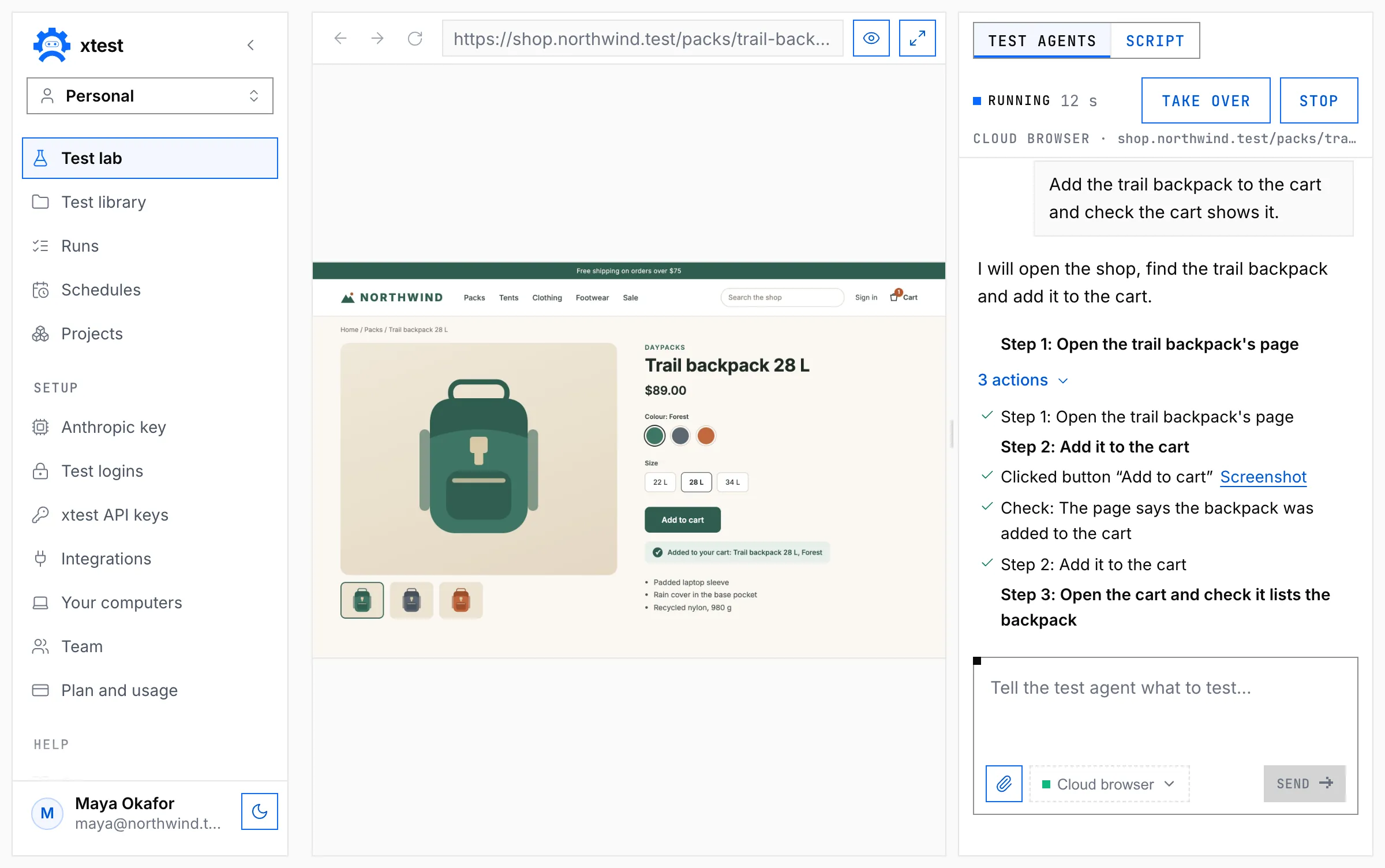
A test agent adding a backpack to a demo shop's cart on the Cloud browser. The page on the left is live.
2
Places to run: the Cloud browser, or Chrome on your computer
8
Kinds of check on the web
$0
AI cost of a replay when no step needs the AI
30 days
Screenshots kept with every run
[01 · Two browsers]
The Cloud browser, or your own signed-in Chrome.
Pick per run. Both keep every step in Runs, and a test agent's screenshots for 30 days.
Cloud browser
Chromium on xtest’s servers, shown live in your tab. Nothing to install. It cannot open localhost or private addresses, and it does not download files.
- Install
- Nothing
- Reaches
- Public addresses
- Started from
- Test Lab, schedules, the API, MCP and CI
Chrome on your computer
Through the xtest app: its own Chrome for Testing on your Mac or PC, separate from your everyday Chrome and signed in to your sites between runs.
- Install
- The xtest app
- Reaches
- What your computer reaches
- Started from
- Test Lab and schedules
Watch live and take over
Answer the test agent’s questions, take over the mouse and keyboard, give it back, or stop.
Mobile web
The same test at an iPhone’s size, with touch, in Chrome on your computer.
Saved scripts
Record a click-through on the Cloud browser and get an ordinary Playwright script, or paste one and watch it replayed step by step.
By hand
Work a suite as a checklist beside xtest’s Chrome window: every mark saves a screenshot, and a Fail needs a note.
[Your own site]
Point it at your staging site. For localhost or a private network, use the xtest app.
[02 · Replays you can trust]
A replay that passes means it passed.
Each saved step remembers what it did, and a replay checks it again.
Checks wait for the page
A check waits for the page to settle before it reads, so “no error is shown” is never read before the error appears.
Cloud browser; xtest app 0.5.8 and later
Steps remember where they ended
A replay that finds a different screen stops with Needs a look instead of passing.
Cloud browser; xtest app 0.5.6 and later
No second click on Place order
A click that may already have gone through is never clicked a second time on replay.
Cloud browser; xtest app 0.5.8 and later
Look-alike rows stop the step
When a list gains a row that looks the same, the saved step stops instead of clicking the wrong one.
Cloud browser; xtest app 0.5.8 and later
A fresh value every run
Write {unique} in a step, such as qa+{unique}@example.com, and a saved sign-up never reuses yesterday’s address.
Errors behind the screen
A replay files your site’s own errors, such as a call to your server that answered 500, even when every check passed.
Failed calls: everywhere. Console errors: Cloud browser; xtest app 0.5.10 and later
Strict mode replays the saved steps only and changes none of them; a step that no longer fits ends the test with its reason.
[03 · Logins and secrets]
Sign in once. The password is typed without telling the AI.
- Saved logins
- Save a site login once, with an authenticator key if the site asks for a code. The test agent signs itself in, and the server makes the one-time code.
- What the model is told
- The password is typed on the device, and the model is told only that the field was filled. Every spelling of the secret is masked before text reaches the AI or is stored.
- Screenshots
- Password and one-time-code fields are covered in every screenshot, and a plain field a saved secret was typed into is painted over in later pictures (Cloud browser, and xtest app 0.5.9 and later).
- The right field
- A teammate’s saved password or code goes only into a password or one-time code field on its own site, and any saved password only into a password field (Cloud browser, and xtest app 0.5.9 and later). Your own saved login goes in on another site only once you allow it, on a saved test’s replay too; on the Cloud browser and from xtest app 0.5.18, that includes a frame from another site on the page.
One limit, said plainly: if your site’s own show-password control reveals a password, it can appear in the live picture.
[04 · What it does not do]
What it does not do
- Firefox, desktop Safari or WebKit: the engine is Chromium.
- Load testing: the performance test agent measures one browser, three loads a page.
- Localhost, private addresses and downloads on the Cloud browser.
- Runs on your own computer started from the API, MCP or CI: those use the Cloud browser.
- A screenshot-diff engine: visual checks are a test agent looking at the screen.
[05 · Questions]
Questions
Chromium. On the Cloud browser it runs on xtest’s servers; through the xtest app it is its own Chrome for Testing on your computer, and your installed Chrome or Edge stands in until that has downloaded.
Not from the Cloud browser, which refuses localhost and private addresses. Install the xtest app and pick Chrome on your own computer instead.
Yes. Paste a Playwright script and xtest reads it into steps and replays them in the browser; anything it cannot replay is named, never skipped. Nothing you send runs as code on xtest’s servers.
When a saved step no longer fits, the test agent takes over from that step and saves the repair. A repair that would change what the test checks waits for your approval.
Thirty days with the run, then deleted. Deleting the run deletes them sooner.
Yes. Write {unique} in a step, such as qa+{unique}@example.com, and every run gets a fresh value.
[Explore the product]
Explore the product
Every claim on this page was checked against xtest’s code on October 3, 2026. If one has gone stale, write to info@xtest.io.
Test your web app on the Cloud browser today.
Nothing to install, and every run kept with its steps, and its screenshots for 30 days.