On this page
AI test agent
Type what to test in plain English and the test agent does it on the device you picked: the Cloud browser, its own browser window on your Mac or PC, an iPhone simulator on a Mac, or an Android emulator on a Mac or an x64 PC. You watch the device live while it works, one action at a time.
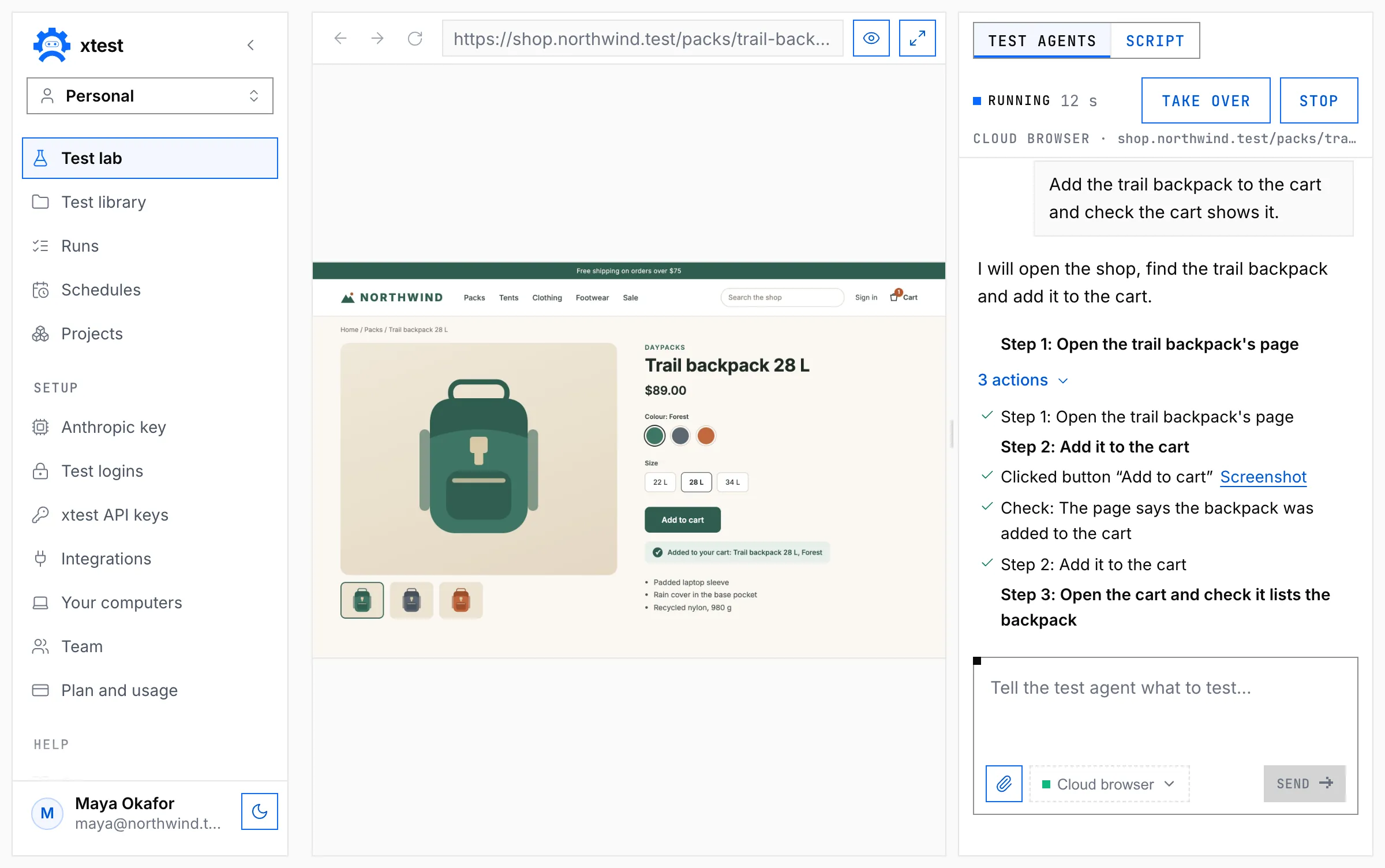
Twelve seconds in. Every action is listed as it happens, under the step it belongs to, and the page on the left is live, not a recording.
What a run looks like
You: Sign in as the standard user and add a backpack to the basket.

  → opened saucedemo.com                       Screenshot
  → typed the username                         Screenshot
  → typed the password
  → clicked Login
  ✓ check: the URL contains /inventory         Screenshot
  → clicked Add to cart on Sauce Labs Backpack Screenshot
  ✓ check: the basket shows 1                  Screenshot

Result: passed. 6 actions, 2 checks, 41 s.
What it can do
The tool list is fixed, with no shell and no code execution. Most tools work the device as a person would. In a browser:
Look
screenshot, read_page, get_page_text, find
Act
left_click, right_click, double_click, hover, left_click_drag, scroll, type, key, form_input, file_upload
Move
navigate, new_tab, list_tabs, switch_tab, close_tab, wait, zoom
Diagnose
read_console, read_network
On a phone the test agent has its own tools for the screen, the app and the phone’s conditions. Mobile testing lists them, under What the AI can do on a phone.
Besides the tools that make the run’s own record (its steps, checks, questions to you, findings, notes and saved tests), these reach past the device:
fault_request makes one request of the site fail or slow down, to see how the app copes: an error, no network, a delay, or no answer at all. On an Android emulator it takes the whole emulator offline instead, and an iPhone simulator has no such tool. In the xtest app on your computer it needs version 0.5.11 or later.
backend_check asks your test API one of the read-only checks a test’s test environment names, with GET, and nothing else. A test without one has no such tool.
read_ticket, which every run has, reads a Jira issue from what your workspace connects. The issue goes to the AI as an untrusted tool result, in the same way as page content, and the test agent is told that nothing in it is an instruction. It reads no monday.com item: asked for one, the test agent is told the item shows on its page in Projects.
In the test agent’s chat in Test Lab, except in an Exploratory test’s run, it has five more, and none of them acts on the app you are testing:
- recall looks up your workspace’s runs, findings, tests, schedules and notes, without naming the teammate behind any of it, or their computer.
- reopen_file opens a file you attached earlier in the conversation again, while the file is kept, which sends it to the AI again.
- list_devices looks up your devices and your workspace’s projects.
- switch_device moves the conversation to the device you asked for, at once, when your words name it or its kind, and opens it; otherwise you get a card to press.
- propose_device suggests moving the conversation to another of your devices, and only your press, or a yes, moves it.
A saved test or a suite you run in a Test Lab conversation runs as any test run does, without these five.
You can take the device back
Take over gives you the mouse and keyboard mid-run, and what you do is recorded as part of the run. Give back hands it over again, with the page as you left it. Stop ends the run there. If you use the app's Chrome yourself while a run is going, the AI pauses and waits for you.
It asks before it pays, deletes or sends
The check is on the server, before the action is dispatched, and it asks the device what the control actually is rather than trusting the model's description of it. Buttons, links and menu items named like a payment, a deletion or a send stop and ask you. Radio buttons, checkboxes and dropdowns do not, because choosing express delivery is not buying anything. Nor does a button your test's own step says to press: in a step that reads "Tap the Send button", the send goes without a question. A step that says not to send still asks.
A second rule is always on, whatever your setting: going to a site the task never mentioned stops and asks. That is the guard against a page that tells the AI to carry on somewhere else. Neither rule fires when saved steps replay, since you approved those already.
Three rules that are always on
In a browser these hold whatever your settings. In the xtest app on your computer they need version 0.5.8 or later; the Cloud browser always has them.
A pay, delete or send button whose click may have gone through is never clicked again without you.
When a page stops answering right after a click, the click may already have counted. The AI is told not to click again and to read the page first, and a second click on a button named like a payment, a deletion or a send waits for you in that test, whatever your setting. With nobody watching, as in a scheduled run, the test stops there instead. A saved step that may have gone through is not replayed a second time in that run either.
Typing into nothing is refused.
The AI has to click into a field before it types. A test it saves from scratch under this rule stops on replay where nothing would take the text. A test first saved before the rule, even after a repair, and typing you did yourself replay as they always did, and the result says when the text may have gone nowhere.
A dialog no saved step answers fails the replay.
When saved steps replay and an alert, a confirm or a prompt opens that no saved step answers, xtest dismisses it and fails the step it interrupted, quoting what the dialog said. Before, the page could wait on the dialog until the run gave up. When the saved steps stop short and a test agent finishes the test, the dialog is left for the test agent.
What it remembers
Short notes about your product, kept per site, or per app on a phone, and shown to you under "What the test agent knows" on a test’s page. Each is at most 300 characters, and a note the test agent writes is refused if it contains the site’s saved login, one of the run’s secrets, or an address outside the sites the run is about. A note it writes waits for you to press Keep before the AI ever sees it again when:
- the run it was written in, or in a suite the test, was blocked or ended with an error
- it was written after the test agent read a page on another site
- it was written after the test agent read a Jira issue
- it was written after the test agent was given words from earlier runs, tests or another person: the record of the conversation’s earlier runs, a teammate’s conversation you continued among them, a look-up of runs, findings, tests or schedules, or xtest’s own findings against an issue it looked up
- it was written while the test agent worked a test case that waits for a person to press Looks good, one imported from Xray or one a test agent added, or xtest’s own check of a finding a test agent reported, or a later test of the same run once it was told the issues reported while it worked one
In the test agent’s chat in Test Lab, except in an Exploratory test’s run, it also has what was asked and done earlier in the same conversation, on any of your devices, or in a teammate’s conversation you continued as your own, as it was when you continued it, and it can look up your workspace’s runs, findings, tests, schedules and notes. One conversation, in the Test Lab docs, says how. A saved test or a suite you run in the conversation runs as any test run does, without what was asked before and without the look-ups.
The second run replays at no AI cost
Working a test out costs about $0.15 of Claude, once. The four test agents whose job is to produce steps, Automation, Regression, System and Acceptance, save them as they go, and Run with a test agent replays those with no AI cost unless a step needs the AI. If a step no longer fits the page, the AI picks up from that step rather than starting again. Accessibility, Exploratory, Usability and Performance report what they find rather than leaving steps behind, so those cost the model every time you run them.
[Academy courses]