On this page
Testing in plain English
You do not write a test script here. Natural language is the test: you type a sentence, and a test agent carries out the end-to-end test on the device you picked, whether that is the Cloud browser, Chrome on your own computer, or an iPhone simulator or an Android emulator on a Mac. It reads the page as it goes, so it copes with a layout it has never seen.
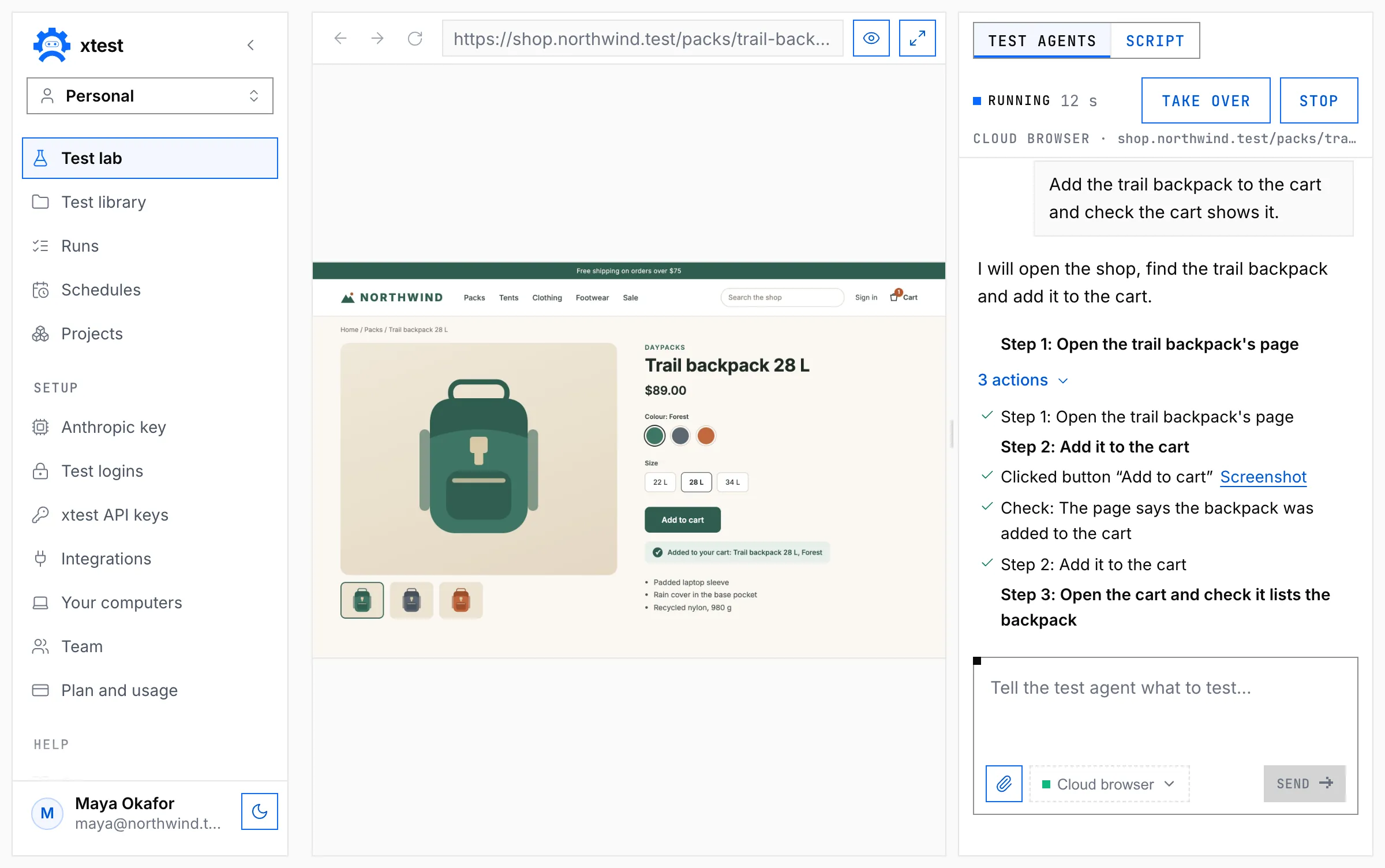
Each line is one thing the test agent did, under the step it belongs to, with a Screenshot link where it kept one, for 30 days.
Writing a good instruction
Say where to start, what to do and what would prove it worked. This one has all three:
From the home page, sign up with a new email address and check that the welcome screen greets me by the name I typed.
This one has none, so the AI will guess what you meant and the verdict will be worth less:
Test the checkout.
Open exploration is still useful, and asking for it plainly beats a vague test: “explore the site and write tests for what you find” comes back with tests you can keep.
What the AI does with it
- Works one action at a time, and keeps a screenshot at each check, each failed action and the first action on each new page, up to 20 for each test of a suite, for 30 days.
- Records checks rather than opinions: a phrase is visible, the address moved, a field holds a value.
- Asks you when it is genuinely stuck, or needs a code only you have. What you type into the code or password field of its question is never shown to the AI: xtest types it in itself, in the Cloud browser or through the xtest app 0.5.16 or later, and with an older app you take over and type it.
- Reports what looks wrong as an issue, with what it expected, what it got, and a picture.
- Finishes with a summary you can read in ten seconds.
What it remembers
The steps it worked out are saved against the test case, per kind of device, so the next run replays them at no AI cost unless a step needs the AI. Short notes about your product can be kept alongside, written by you or by the AI: at most 300 characters each, per site, or per app on a phone, and a note the AI writes is refused outright if it carries the site’s saved login, a secret or an address from outside the sites the run is about.
In the test agent’s chat in Test Lab, except in an Exploratory test’s run, it also has what was asked and done earlier in the same conversation, on any of your devices, or in a teammate’s conversation you continued as your own, as it was when you continued it, and it can look up your workspace’s runs, findings, tests, schedules and notes. One conversation, in the Test Lab docs, says how. A saved test or a suite you run in the conversation runs as any test run does, without what was asked before and without the look-ups.
What it will not do without asking
Before the AI presses something that pays, deletes or sends, the server stops and asks you, and it asks again before going to a web address your instruction never mentioned. The site the run started on counts as mentioned, and so does a Jira project’s own address for a run of its tickets. That second rule is the guard against a page that tries to give the AI orders of its own.
The model, and what it costs
Claude Sonnet 5 drives the device. Working a test out costs around $0.15 of Claude once; its saved steps then replay at no AI cost unless a step needs the AI. On the $25 plan it runs on your own Anthropic key, encrypted with AES-256-GCM; Professional and above include the AI.